If a syllabus or an assignment link just told you to “write this one in Clarity,” you probably want three answers fast: what the tool keeps, who gets to look at it, and whether it gives your essay an AI percentage. This page walks through Clarity the way you meet it, first from the student chair, then from the instructor’s side, and ends with a plain table of what is logged and what is not. The AI percentage question has its own home: our guide to Turnitin’s separate AI writing indicator covers how that score is produced.
I put this walkthrough together by reading Turnitin’s guides for students, instructors and administrators on October 26, 2026, then redrawing each screen as a diagram of my own rather than reusing Turnitin’s screenshots. Where a guide is silent, I say so instead of guessing. The HumanizeMy detector in the box above is the quickest way to see how a paragraph of your draft reads before anyone else reviews it.
What Is Turnitin Clarity?
Turnitin Clarity is a composition space your school adds to Turnitin Feedback Studio: you write, revise and submit the assignment inside it, and it keeps a history of how the text was built. Turnitin calls that history the student’s “proof of process.” Turnitin announced general availability on July 15, 2025.
Clarity is not a separate app you download. A student can meet three Turnitin pieces in one course, and each is licensed by the school on its own:
| Turnitin piece | What it is for a student | Source |
|---|---|---|
| Turnitin Feedback Studio | The base Turnitin product a school already runs; Clarity is only sold to its customers | EV-07, EV-09 |
| Turnitin Clarity | The writing space add-on where you draft and submit, and where the process record is built | EV-07, EV-09 |
| Turnitin Originality | A separate license; only with it does AI writing detection appear in the Writing Report | EV-08 |
So a process record and an AI score come from different purchases. A course can run Clarity’s writing space and its Writing Report with no AI writing score at all, which is why the answer to “does Clarity check for AI” is covered on its own further down.
What Does a Student See in Turnitin Clarity?
A student in Turnitin Clarity sees a browser-based writing space and writes the whole piece there before pressing submit. Everything typed, deleted or pasted into that space becomes part of the record your instructor receives. After submission, what you can open yourself depends on settings your instructor chooses.
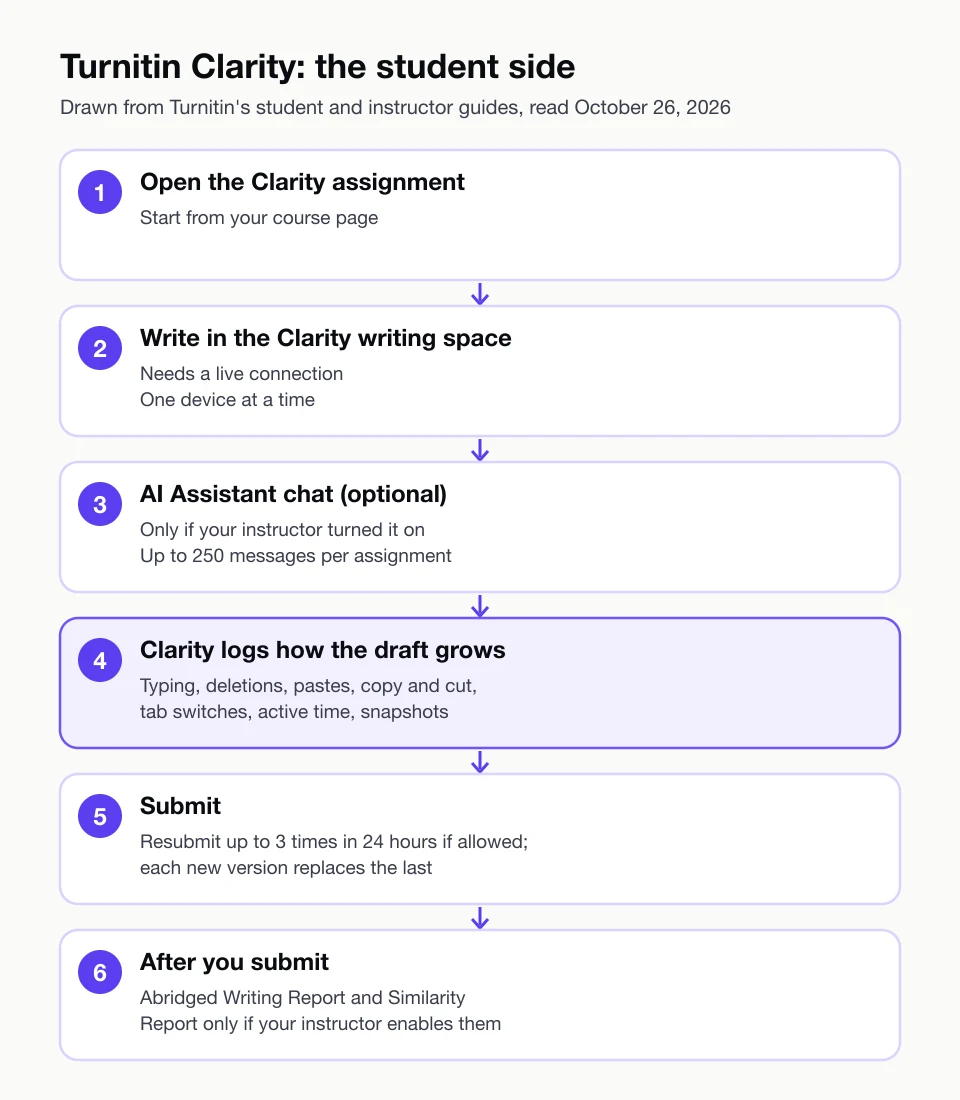
Here is the student route, one screen at a time.
- Opening the assignment. You start from your course page, which hands you into Clarity’s writing space. Turnitin’s guides describe all drafting happening in that space; work written elsewhere is not tracked and cannot be submitted to produce a Writing Report.
- The writing space. You type your draft here. Clarity has no offline mode: if your connection drops, the editor freezes rather than letting you keep typing. Turnitin also warns that keeping the same draft open on several devices at once can cause syncing trouble and lost work.
- The AI Assistant panel, if it is there. Some assignments include a built-in AI chat. It appears only when the instructor enables it, Turnitin states that it will not write your paper, and you get up to 250 messages per assignment.
- Submitting. When you submit, the draft and its writing history go to the instructor. If resubmission is turned on, you can submit up to three times within 24 hours, and each new version replaces the previous one, including any grade and feedback already given.
- After submission. Which reports you can open from here is your instructor’s choice, as the next answer explains.
Can I See My Own Writing Report in Turnitin Clarity?
You can see your Clarity Writing Report only if your instructor makes it available. Turnitin’s administrator guide says the full report is for instructors, while students see an abridged version when the instructor turns on student access in the assignment settings. The Similarity Report works the same way: you see it only if your instructor enables it for students.
Is the AI Assistant Inside Turnitin Clarity Private?
No. Turnitin’s guide states that every exchange with the AI Assistant is logged and shared with your instructor after you submit. Treat the chat panel like a conversation your instructor will read later, and check your course policy on how its suggestions may be used.
What Does My Teacher See in Turnitin Clarity?
Your teacher sees your submitted paper together with a Writing Report: a list of the passages you pasted, each labelled Unchanged or Changed, plus a playback of how the draft grew from the first session to submission. If the AI Assistant was switched on, the chat history comes with it. An AI writing score appears only under an extra school license.
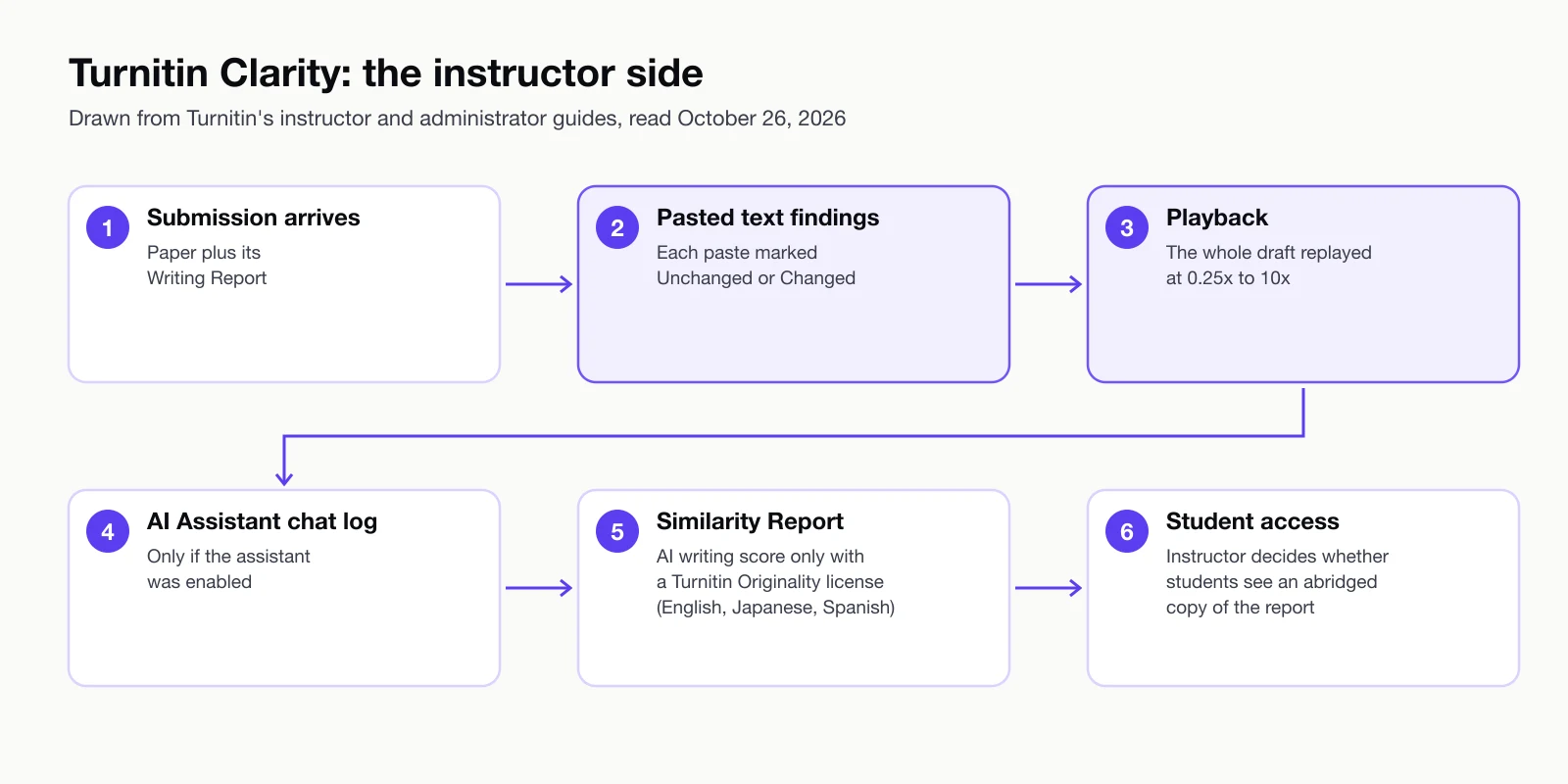
Walking through the instructor view in order:
- The submission and its Writing Report. The writing process you built becomes visible to the instructor once you submit, which is what Turnitin means by proof of process.
- Pasted text findings. Each paste from outside the writing space is listed. Turnitin marks a passage “Unchanged” when it stayed the same from the moment it was pasted until submission, and “Changed” when you edited it afterwards.
- Playback. The instructor can play, pause, skip and rewind the draft at speeds from 0.25x to 10x. Turnitin’s student guide to the same report (EV-04) says a green highlight marks added text, a green strikethrough marks deleted words, and a purple underline marks pasted text.
- AI Assistant activity. When the assistant was enabled for the assignment, the instructor gets the logged conversations.
- Similarity and, only with Originality, AI writing detection. The Similarity Report sits alongside. AI writing detection shows up in the Writing Report only if the institution also licenses Turnitin Originality.
What Happens When I Paste Text Into Turnitin Clarity?
A paste into Turnitin Clarity is logged as its own finding, kept in time order, and later tagged Unchanged or Changed depending on whether you edited it. Pasting your own notes, a quotation you are citing, or a paragraph from an earlier draft will all show up the same way, so the label tells your instructor where text came in, not who wrote it. The guides we read define the two labels but do not say how an instructor should weigh a pasted passage; that judgement is left to the person marking the work.
That distinction matters for honest work too. On Turnitin’s own educator forum, one instructor reported that text corrected through a grammar tool was flagged as a paste, which they felt could mislead a reader of the report; Turnitin’s community manager said the feedback would go to the product team. That is a single report, not a measured pattern. If your course allows a grammar or citation tool outside Clarity, saying so to your instructor up front keeps the report easy to read. Our guide to ways to show your own writing process covers what else counts when you need to explain a draft.
What Does Turnitin Clarity Record, and What Does It Not?
Turnitin Clarity records what happens inside its writing space: insertions and deletions, clipboard pastes, copy and cut events, active and inactive time, tab switching, browser window focus and periodic snapshots. Turnitin’s student guide says it does not capture what you do outside that space and that it is not a proctoring environment. The table pairs each item with the evidence entry it comes from.
| What happens | Recorded by Clarity? | Source |
|---|---|---|
| Typing, deleting and revising text in the writing space | Yes | EV-01 |
| Pasting from the clipboard | Yes, each paste listed and later marked Unchanged or Changed | EV-01, EV-04 |
| Copy and cut inside the writing space | Yes | EV-01 |
| Time spent actively modifying, engaged with the document, or inactive | Yes, captured and aggregated | EV-01 |
| Switching browser tabs; browser window focus, open and close | Yes, the switch itself is logged | EV-01 |
| Periodic snapshots of the work in progress | Yes | EV-01 |
| Chats with the AI Assistant (when enabled) | Yes, shared with the instructor after submission | EV-03 |
| What you do in another tab, app or document | No, activity outside the writing environment is not captured | EV-01, EV-06 |
| A draft written somewhere else and never typed in Clarity | Not tracked, and it cannot be submitted to produce a Writing Report | EV-06 |
| Live supervision of you while you write | No: “not a proctoring environment,” and Turnitin says it does not capture writing in real time | EV-01 |
| An AI writing score | Only if the school also licenses Turnitin Originality, and only for English, Japanese or Spanish | EV-08, EV-06 |
The two rows people most often mix up are tab switching and outside activity. Clarity notes that you left the writing space; it does not see what you did once you were gone. A log is only part of what an instructor weighs; our piece on what teachers actually notice in a draft covers the rest.
Does Turnitin Clarity Detect AI?
Turnitin Clarity does not score your writing for AI on its own. Turnitin’s administrator guide says AI writing detection appears in the Writing Report only when the institution also licenses Turnitin Originality, and that without it nothing AI-generated outside the built-in assistant is flagged. Where it is licensed and enabled, detection works only for English, Japanese or Spanish submissions.
That split is why one university’s student help page states that Clarity “is not an AI detection tool,” while Turnitin’s own materials describe AI writing detection inside the same report: both are true once you separate the writing space from the detection add-on. How Turnitin’s AI writing score is calculated and read is explained on our Turnitin AI checker page, and nothing about Clarity changes those mechanics.
What you can do yourself is see how your prose reads to a detector before submission. Paste a paragraph into HumanizeMy’s no-account detector and you get a score and a verdict of Human, Inconclusive or AI Detected in seconds; a free account opens the full breakdown of which signals moved that score and which sentences stood out.
Is Turnitin Clarity Free for Students?
Turnitin Clarity is not something a student buys or signs up for: Turnitin sells it to schools as a paid add-on to Feedback Studio, publishes no price, and sends pricing questions to a Turnitin account manager or its sales team. We found no student license and no individual sign-up on any page we read, so the way a student uses Clarity is through a course where the instructor has set up a Clarity assignment.
Licensing happens campus by campus. The University of Florida, for example, lists Clarity as available across campus and says the university covers the cost. Whether your course uses Clarity, and which parts are switched on (the AI Assistant, your access to the Writing Report, the Similarity Report), is set by your school and your instructor, so the person to ask is your instructor or your school’s learning-technology support.
What you can use today without a school license: the HumanizeMy detector takes 4 scans a day of up to 250 words with no account, and one scan runs up to 60,000 characters once you sign in. A free account adds the AI humanizer for 4 runs of up to 250 words each, a one-time allowance. For full-length essays, see plans that cover a full essay.
What Have Schools Said About Turnitin Clarity?
Schools that have written about Turnitin Clarity are mixed. The University of Colorado Boulder ran a limited pilot in spring 2026 and concluded it “did not provide sufficient evidence to support broader institutional adoption at this time,” while other campuses, such as the University of Florida and Cal State San Marcos, list it as available to students.
CU Boulder’s write-up says faculty valued seeing the writing process but raised concerns about usability, fitting Clarity into their workflow and how well it addresses AI use, and it notes participation was limited. In March 2025, months before general availability, the integrity blog Plagiarism Today observed that the approach gives Turnitin more control over the writing environment and could draw pushback over privacy. In April 2026, ISTE gave Clarity its ISTE Seal; the seal report says reviewers work from data the vendor provides, and it judges the product as a classroom tool rather than testing any detection.
None of these is a measurement of how often Clarity’s records mislead anyone. They are what a few institutions and observers have published so far.
What Should I Do Before I Submit in Turnitin Clarity?
Before you submit in Turnitin Clarity, write the whole draft inside the writing space on one device with a steady connection, use a web browser rather than the Canvas Student app, and decide on resubmission carefully because a new version replaces the old grade and feedback. Then read your draft once more for anything you would want to explain.
A short checklist, all drawn from the guides and university pages above:
- Stay online, on one device. The editor freezes when you go offline, and having the draft open on two devices at once can lose work.
- Use a browser. Cal State San Marcos warns its students that Clarity does not work properly in the Canvas Student app.
- Keep your drafting in Clarity. Text written elsewhere and pasted in shows up as a paste finding; a document written entirely outside Clarity cannot be submitted to generate the report.
- Know the AI Assistant rules. It appears only if enabled, caps you at 250 messages, and your instructor reads the chat after you submit.
- Think before resubmitting. If resubmission is allowed, you get up to three tries in 24 hours, and each replaces the previous version along with its grade and feedback.
The last check is how your prose reads to a detector, since your school may hold the separate license that adds an AI writing score to the instructor’s report. For longer pieces, a paid plan for full-length essays handles the whole document in one go. For a quick look right now, scan a draft before it reaches the instructor view.
Limitations. Turnitin edits these guides often (most were updated in October 2026), so a setting described here can change, and your school may switch features on or off. We did not use Clarity inside a live course for this page; the walkthrough and both diagrams are built from Turnitin’s published guides, not from screenshots. No source we found measures how often Clarity’s paste or time findings are misread, so this page makes no claim about that. The university pages describe single campuses, and the CU Boulder pilot was small. Reddit could not be reached in this run, so the only first-hand report of how a Clarity record reads in practice is one educator’s forum post.
Disclosure. HumanizeMy makes an AI detector and an AI humanizer. We have no business relationship with Turnitin and received nothing from Turnitin or any school named here.
Written by Fırat Mıhcı. Profile and publications: ResearchGate.